Turo license verification: every check Turo asks for, in one table
Before a Turo trip, Turo asks the host to confirm the guest's driver's license. Once the guest has uploaded their license and selfie, DriveIt reads both with AI and shows what Turo expects next to what the license says, with a ✓ or ✗ on each line. You read the table and press Approve on Turo, or Deny to ask for new photos. The photos are never shown or kept. Free for the rest of 2026.
What Turo asks a host to check
Turo's help center asks hosts to confirm the primary guest's license before every trip. The checks come down to a handful of questions: is the name the one on the reservation, is the date of birth right, does the face match the photo, is the license valid for the whole trip, and is it a full license rather than a permit, an ID card or something altered.
Doing that by eye on a phone, trip after trip, is where things slip: an expiry date that lands two days before the return, a learner's permit that looks like a license at a glance. Turo's own article on confirming a license has the full list.
The five checks, side by side
The same screen you get on a Turo trip in DriveIt. Here the license has expired before the trip ends, so that row is a ✗.
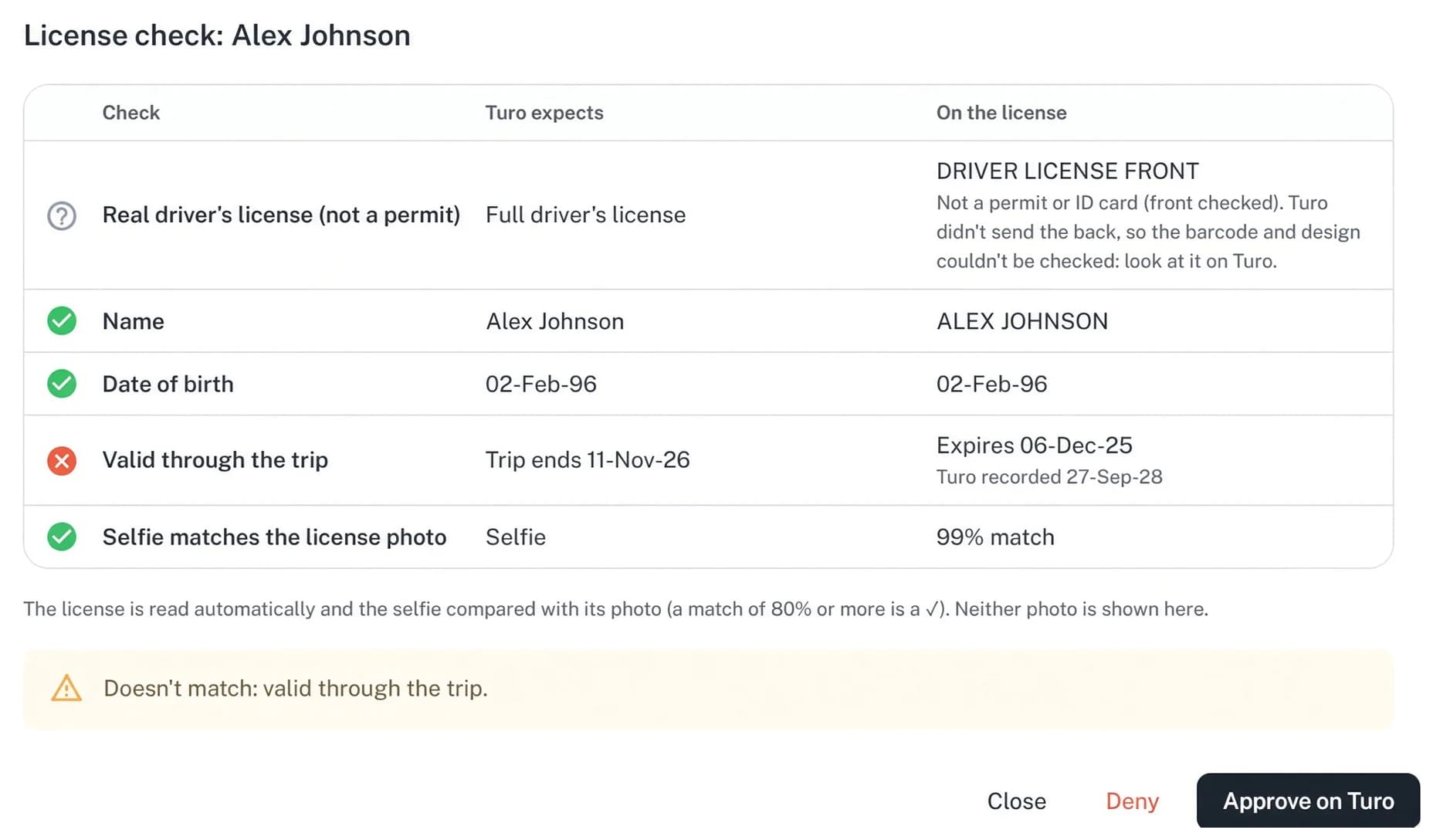
| Check | Turo expects | How DriveIt reads the license |
|---|---|---|
| Real driver's license (not a permit) | A full driver's license | The front is read by AI. When Turo sends the back, its barcode is decoded and the license number and date of birth compared with the front. A learner's permit or an ID card is flagged and can't be approved, only denied. |
| Name | The guest's name on Turo | The name printed on the license. The same first and last name is a match; a middle name or initial doesn't fail it. |
| Date of birth | The birth date Turo verified | The date printed on the license, read the right way round on licenses that print the day first. |
| Valid through the trip | The trip's last day | The license's expiry date must be on or after the day the trip ends, not just today. If Turo recorded a different expiry, the row shows both. |
| Selfie matches the license photo | The selfie the guest took | A face comparison between the selfie and the license photo, shown as a percentage. 80% or more is a ✓. |
Approve on Turo, or ask for new photos
Open the trip
On Reservations, a Turo trip whose guest has uploaded their license shows a Review chip. Click it.
Read the table
Five rows, each with what Turo expects, what the license says, and a ✓ or ✗. Anything that doesn't match is listed under the table.
Approve on Turo, or deny
Approve sends your approval to Turo with each check's result. Deny sends the guest a message in the Turo trip asking for new, clear photos. Turo takes a few minutes either way.
After a deny, DriveIt waits for new photos
Turo doesn't tell hosts when a guest uploads new photos, and the license keeps waiting for review the whole time. So after you deny, DriveIt hides the Review button and the trip shows DL denied · Waiting for new photos.
About every 30 minutes until the trip is over, DriveIt checks whether the guest sent different photos. When they have, the trip shows New DL photos · Review and you review the new ones. If the license is approved on Turo in the meantime, the denial is cleared.
What it doesn't do
- It doesn't decide for you. A ✗ is a flag. Approving or denying is yours. The one thing it won't let you approve is a permit or an ID card.
- It doesn't keep the photos. License photos and selfies are read in memory and never saved or shown. The table is dropped after 10 minutes.
- It doesn't check the back when Turo doesn't send it. The real-license row then shows a question mark and asks you to look at it on Turo.
- It doesn't replace the handover. If something looks off when you meet the guest, follow Turo's guidance and contact Turo.
- It doesn't review before the upload. Until the guest uploads their license on Turo, there's nothing to read.
What it needs from you
Invite DriveIt on Turo Teams
The same co-host invitation that brings in your trips, tolls, check-ins and parking. Your cars pair by VIN.
Wait for a guest's upload
When a guest uploads their license and selfie on Turo, the trip's license chip shows Review.
Review from the trip
Nothing else to set up. Approve or deny from the same screen.
Questions about Turo license checks
Does DriveIt verify the license instead of me?
No. Turo asks the host to confirm the guest's license. DriveIt reads the photos and lays out the five checks so you can decide in a minute. Approving sends your approval to Turo; denying is your call too.
When can I review a license in DriveIt?
Once the guest has uploaded their license photos and selfie on Turo. The trip's license chip then shows Review. Until the photos are in, there's nothing to review.
What counts as a match for the name?
The same first and last name as on Turo. Middle names, initials and capital letters don't fail it. If only a nickname differs, read the row and decide.
Why is the expiry row a ✗ when the license isn't expired?
The license has to be valid through the last day of the trip, not just today. The row shows the expiry read from the license and, if it differs, the one Turo recorded.
Why can't I approve a learner's permit or an ID card?
Turo asks for a full driver's license. DriveIt won't approve a permit or an ID card; deny it, and the guest is asked for new photos.
What's the selfie percentage?
How closely the selfie resembles the photo on the license, from 0 to 100. 80 or more is a ✓. It's a flag, not an identity decision: look at the whole table.
Does DriveIt keep the guest's license photos?
No. The photos are read in memory to build the table and are never saved or shown on the screen. The table itself is dropped after 10 minutes.
What does the guest see when I deny?
A message in the Turo trip conversation asking for new, clear photos of their license. A note you add stays with the decision.
How do I know when the guest sent new photos?
After a deny, the Review button is hidden and the trip shows DL denied, waiting for new photos. About every 30 minutes until the trip is over, DriveIt checks whether different photos came in. When they do, the trip shows New DL photos, Review.
What if Turo didn't send the back of the license?
The real-license row shows a question mark and asks you to look at it on Turo. The other four rows still work from the front and the selfie.
How much does DriveIt cost?
Every DriveIt tool is free for the rest of 2026: no subscription and no booking commission from DriveIt. On direct bookings, Stripe's card fee (2.9% + 30¢ on standard US cards) goes to Stripe.
What do I need to connect Turo?
A co-host invitation on Turo Teams to DriveIt's co-host account, and Turo's emails forwarded from your Gmail. Turo setup explains both.
Read more
- Turo fleet automationWhat runs on its own, what DriveIt prepares for you to confirm, and what stays with you.
- Turo host toolsReservations, check-ins, tolls, reviews, customers, payouts and fleet status.
- Turo pricing automationPrice Autopilot re-applies your Turo price rules every morning, up to 365 days out.
- Turo check-in, check-out, extra miles and late returns: the host's sideThe time limits for filing Turo readings, charging extra miles and reporting a late return, and how a tracker fills in the numbers for you.
- Know your Turo guests: repeat guests, do-not-rent notes and reviewsOne customer list across your Turo trips: repeat guests, what each guest cost or earned you, private notes, and a do-not-rent flag that warns you when they book.
- How to set up DriveIt for a Turo fleet: co-host invite, email forwarding, VIN importThe exact setup for Turo hosts: invite DriveIt's co-host on Turo Teams, forward Turo's emails from Gmail, and import your cars by VIN. Free for the rest of 2026.
Running a few cars? See how the tools fit together.
Open the trip. Read five lines. Approve.
Every DriveIt tool is free for the rest of 2026: no subscription and no booking commission from DriveIt. On direct bookings, Stripe's card fee (2.9% + 30¢ on standard US cards) goes to Stripe.
Turo is a trademark of Turo Inc. DriveIt is not affiliated with, endorsed by, or sponsored by Turo.